EFDC+ Explorer
A Pre- & Post-Processor for the Environmental Fluid Dynamics Code
Model Parameter Setup
EFDC+ Explorer (EE) provides a powerful GUI for configuring and calibrating EFDC+ parameters. Built-in error-checking and context-sensitive tooltips guide you toward appropriate values at every step, reducing reliance on the user’s guide and accelerating your workflow.
Timing Parameters
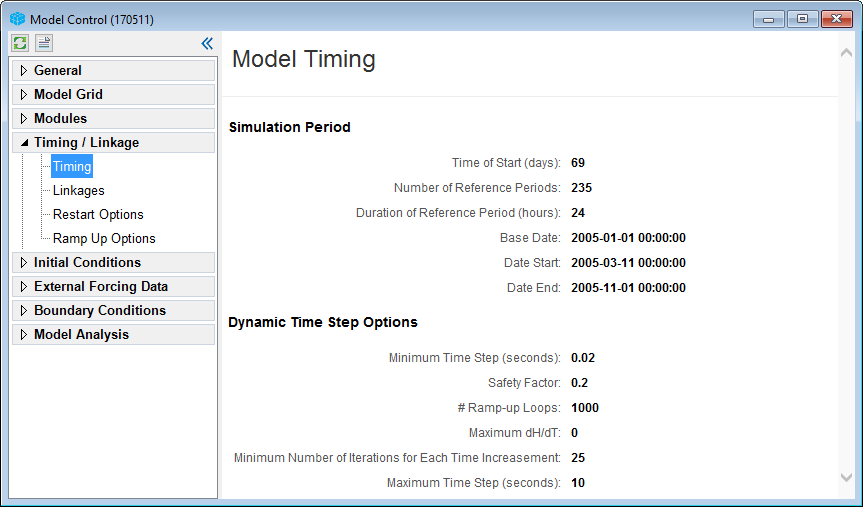
Model timing settings GUI in EE.
Timing Parameters
Set model run start and end times with built-in guidance for selecting appropriate time steps. EE supports dynamic time stepping and both Julian and Calendar date formats for flexible time management.
Parameters & Settings
Hydrodynamics
Pre-configured templates with default values for turbulent diffusion and vertical eddy viscosity get your model running quickly, providing a solid starting point for hydrodynamic simulations.
Sediment Transport
EE supports two erosion modeling approaches: the native EFDC+ framework and the SEDFlume-based SEDZLJ method. Both handle cohesive and non-cohesive transport, with or without bedload, and support hydrodynamic feedback for morphological analyses.
Toxics
Model any number of toxic constituents using EFDC+‘s flexible sorption options, including 1-, 2-, and 3-phase partitioning. EE helps you navigate the full range of configuration options within sediment transport simulations.
Wind & Wave
EE supports both internal and external wave sub-models. Internal parameters are automatically initialized with appropriate defaults, while the external option allows seamless import from third-party models. SWAN users benefit from dedicated tooling to build models and import results directly into EFDC+.
Kinetics
Activate full sediment diagenesis and/or the Rooted Plant and Epiphyte Model (RPEM) for submerged aquatic vegetation when building a water quality model. EE automatically assigns default values for the hundreds of required kinetic parameters at model creation, which you can refine during calibration.
Heat Transfer
Configure atmospheric data series, surface and bed heat transfer parameters, and cell-by-cell weather station weightings through an integrated interface. A broad selection of heat exchange and evaporation options accommodates diverse project requirements, with default ice computation settings supporting heat-coupled ice modeling.